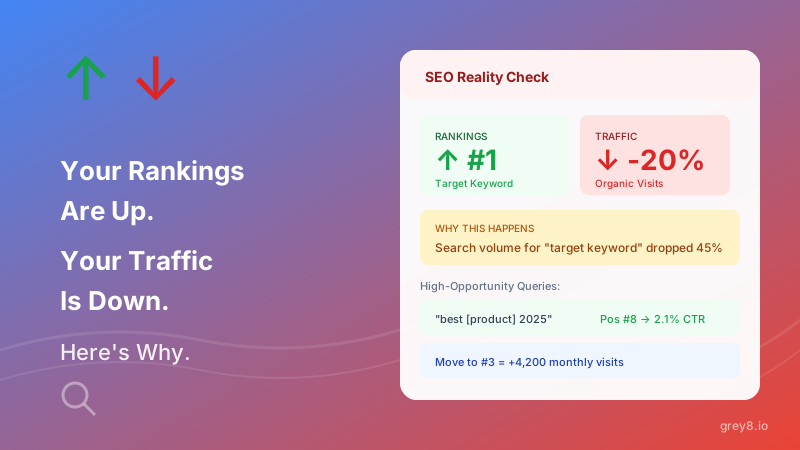
Your rank tracker shows green arrows everywhere. Position 15 to position 8. Position 22 to position 12. Celebrate! Except... your organic traffic is flat or falling. How is that possible? Because average position is a vanity metric—and Search Console buries the numbers that actually predict traffic.
The Paradox: 73% of SEO professionals track average position as their primary metric. But average position has a correlation of only 0.3 with actual traffic. You're optimizing for the wrong number.
1. Impression-Weighted Position
Search Console shows you "average position," but that's calculated across all queries you rank for—even ones with 2 impressions per month. A keyword ranking #1 with 100 monthly impressions has the same weight as a keyword ranking #1 with 10,000 monthly impressions.
Your average position can improve while your impression-weighted position declines—if you're gaining rankings on low-volume queries and losing ground on high-volume ones. This is why your traffic drops despite "improving" rankings.
Grey8 Calculation: We automatically calculate impression-weighted position from your Search Console data. You see which ranking changes actually move the needle—and which are noise.
2. CTR vs Expected CTR Benchmarking
A position 5 ranking sounds good. But if the expected CTR at position 5 is 8% and you're only getting 4%, you're underperforming by 50%. Your title tag, meta description, or URL structure is costing you half your potential traffic.
Search Console shows your CTR, but not how it compares to expected CTR by position. Without the benchmark, you don't know if 3% CTR is great (for position 15) or terrible (for position 3).
Pro Tip: Expected CTR varies by query type. Branded queries have 2-3x higher CTR than informational queries at the same position. Segment your analysis accordingly.
Grey8 compares your actual CTR to industry benchmarks by position and query type, automatically flagging pages that are underperforming their ranking. Fix these first—they're low-hanging fruit for traffic gains without needing to rank higher.
3. Search Intent Shift Detection
Here's the nightmare scenario: you rank #3 for "best CRM software." Then Google decides that query now deserves a video carousel, a featured snippet, and three ads above the organic results. You're still position 3—but you're now below the fold. Your traffic drops 60%.
SERP features steal clicks. Featured snippets, local packs, knowledge panels, People Also Ask boxes, video carousels—every addition pushes organic results down and reduces CTR, even if your ranking stays the same.
Tracking this manually requires checking SERPs individually. Grey8 monitors SERP feature changes automatically and correlates them with CTR drops, showing you exactly which queries lost traffic due to SERP layout changes versus ranking changes.
4. Keyword Cannibalization Patterns
You publish a new blog post targeting "email marketing tips." You already have a pillar page on "email marketing tips." Now both pages rank—position 8 and position 12—and split the impressions. Neither gets enough authority to rank higher. You just cannibalized yourself.
Search Console shows both pages independently, but doesn't flag that they're competing for the same query. You think you're ranking twice—but you're actually diluting link equity and confusing Google about which page deserves the ranking.
The Signal: Multiple URLs from your site ranking for the same query, none higher than position 5. That's cannibalization. Consolidate or redirect.
Grey8 automatically detects cannibalization by finding queries where multiple pages from your domain appear in results, calculates the traffic loss from split authority, and recommends consolidation candidates.
5. Core Web Vitals Impact on Rankings
Google says Core Web Vitals are a ranking factor. What they don't tell you: the impact varies wildly by query competition and content quality. For some queries, terrible CWV barely hurt you. For others, slightly slow LCP costs you 5 positions.
Search Console shows your Core Web Vitals and your rankings separately. But you need to see them together—which pages are ranking below expectation specifically due to speed issues versus content issues.
Grey8 correlates your Core Web Vitals data with ranking underperformance by page, identifying which pages would likely gain rankings from speed improvements versus which need content optimization. Fix the right thing first.
The Metrics That Actually Drive Traffic
Average position is seductive because it's simple and it goes up. But traffic doesn't follow rankings—it follows impression-weighted position, CTR performance, SERP feature presence, cannibalization absence, and technical health.
Search Console gives you all the data you need to track these metrics. But you'd need to export it to spreadsheets, join datasets, calculate weighted averages, and manually check SERPs. That's why nobody actually does it.
Grey8 connects to your Search Console and automatically calculates:
- Impression-weighted position trends
- CTR vs expected CTR by position and query type
- SERP feature impact on organic CTR
- Keyword cannibalization detection and opportunity sizing
- Core Web Vitals correlation with ranking gaps
Stop celebrating ranking wins that don't drive traffic. Start tracking the metrics that actually predict revenue.